Have been looking forward to learning this so I can finally understand how they make those images with 5 characters captured in different movements, well, move.
Animation usually come from a spritesheet, an image file containing a frame of each character's movement in a grid. The're commonly saved as a .png file.
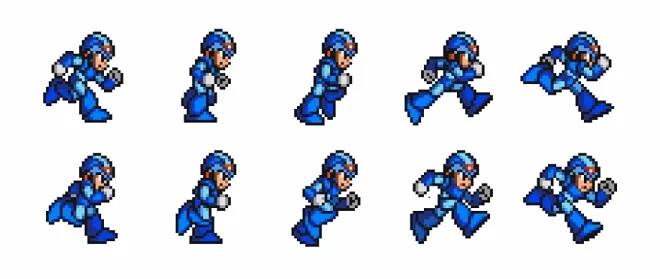
Similar to how images were loaded in PhaserJs Fundamentals, simply use:
this.load.spritesheet()
This function takes on several parameters. First, the name that'll be used to refer to this particular sprite, then a file path or link to the asset itself. Using frameHeight and frameWidth properties, you are able to configure the size of each frame.
this.load.spritesheet("everlein", "/src/this-vault", {
	frameWidth: 120,
	frameHeight: 120
})
Making it move
Under create(), add the sprite on the screen using function
this.add.sprite()
Similar to other add function, it takes three parameters: x, y and the object itself which you'll be placing.
this.add.sprite(300,400, "everlein")
Once that's done, you can create the animation code
this.anims.create({
	key: "walk-down",
	frames: this.anims.generateFrameNumbers("everlein", {start:0, end: 5}),
	frameRate: 10,
	repeat: -1

})
- Key is the name you give to this animation
- generateFrameNumbers() is a method that returns an array of frames, in this case, it starts at 0 and ends in 5. 0 is the first frame, then 5 is the last
- frameRate means 10 frames per second
- repeat is set to -1 because you want to loop it. Otherwise, 0 runs the animation once.